Asana가 StackAI를 인수했습니다. 이제 모든 인간 에이전트 워크플로가 한 곳에서 실행됩니다.더 알아보기


스타트업부터 Fortune 선정 100대 기업에 이르기까지 170,000개 이상의 팀*이 Asana를 신뢰하고 있습니다









Asana와 Smartsheet의 차이점은 무엇인가요?
기능
팀을 위해 구축된 AI
Asana AI 팀원은 업무 그래프를 기반으로 하는 AI 에이전트이므로 첫날부터 팀의 목표, 프로젝트, 종속성을 파악할 수 있습니다. 모든 AI 작업은 확인 가능하며 감사 가능합니다. 더 알아보기.
가치 실현 시간 단축
신속하게 구현하고 생산성, 효율성, 협업을 극대화하세요.
신속한 도입을 위한 체계적인 온보딩 및 지침
Asana는 직관적인 인터페이스와 함께 내장된 가이드, 템플릿, 체크리스트, Asana 아카데미 교육을 제공하여 팀이 빠르게 시작하고, 일관성을 유지하며, 업무 규모가 커져도 체계적으로 업무를 관리할 수 있도록 지원합니다. 더 알아보기
Built-in time tracking
Asana provides built-in time tracking for tasks and projects, enabling teams to estimate and log work directly in the platform, with optional integrations available for advanced analysis. Learn more
직관적인 조직 전체 보고서
Asana는 비즈니스 규모에 따라 조정할 수 있는 실시간 보고 기능을 제공합니다. 팀은 전략을 실행으로 연결하는 대시보드와 인사이트를 통해 수천 개의 프로젝트와 작업에 걸쳐 목표, 포트폴리오, 성과 지표를 추적할 수 있습니다. 더 알아보기
Secure administration at scale
Asana offers governance and compliance features with centralized admin controls, built-in audit logs, and role-based access, supporting scalable administration and audit readiness. Learn more
Asana 고객이 Asana를 선호하는 이유


I've used Trello, Smartsheet, MS Project, and other platforms similar to Asana. I must say that it's by far the simplest to absorb and make your own but still align with your primary platforms for email and calendar.
Having tried other platforms like Smartsheet and Monday, Asana has the cleanest, user-friendly design that doesn't require extensive training. Asana AI Studio is a game changer for automating workflows and coordination.

“Asana를 사용하면 OKR을 관리하고 추적하는 일이 수월해집니다.” 회사의 모든 인원이 주요 우선순위가 무엇인지 알고 이에 따라 업무를 계획, 추적, 보고할 수 있습니다. 이로 인해 효율이 높아져 더 신속하게 실행하고 확장할 수 있습니다.”
- 제품 관리 부문 Dian Rosanti

“Zoom이 성장함에 따라 업무 우선순위를 정하고 비즈니스상의 의사결정을 내릴 수 있도록 모든 진행 상황을 표준화된 방식으로 표시하고 싶었습니다.” 이를 위해 업무 처리 방식과 팀 간 지식 공유 방식에 대한 가시성, 책임감 또는 책임 소재를 파악할 수 있는 능력, 일관성이 필요했습니다.”
- 보안 부문장 Ariel Chavan
Asana는 유연하고 확장 가능한 워크플로로 팀을 지원합니다
Asana가 모든 규모의 팀이 한 곳에서 프로젝트를 사용자 지정하고, 도구를 연결하고, 진행 상태를 보고하는 데 어떻게 도움이 되는지 살펴보세요.
- Automation and AI
- User experience and usability
- Onboarding and training
- Customization capabilities
- Project planning and tracking

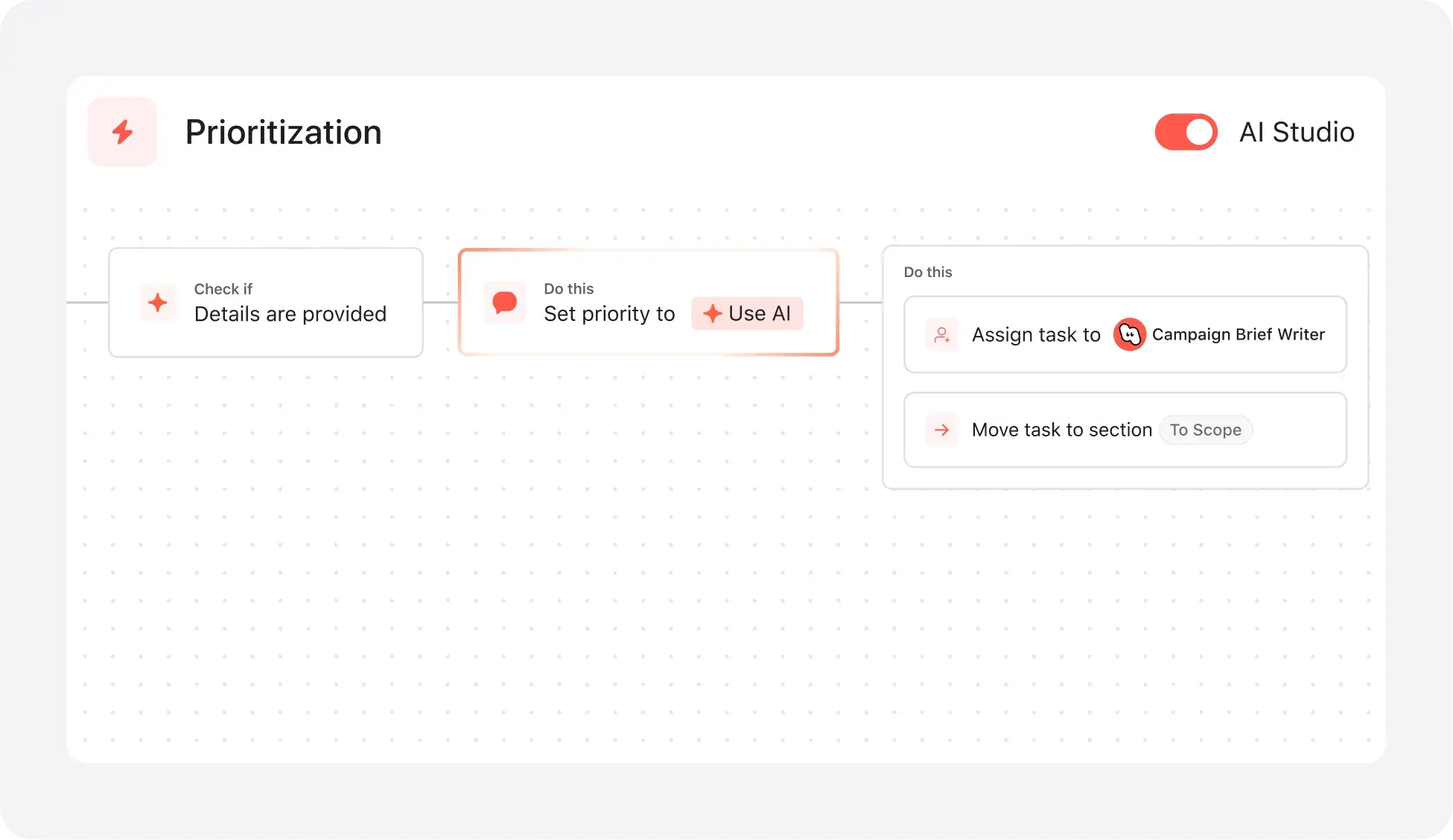
AI your whole team can actually use
Asana AI Teammates understand your goals, projects, and dependencies from day one—Smartsheet’s AI is confined to the "grid," analyzing rows of data without understanding human workflows.
Asana AI Teammates build shared memory that compounds across your whole team—Smartsheet AI resets with every new sheet, preventing the growth of a collective team memory.
Every AI action is visible in your activity log, just like a human teammate—Smartsheet treats AI like a formula, leaving no clear "teammate" identity to track or hold accountable.
Structure work with an adaptable interface
Asana provides a modern, visually intuitive interface with customizable project views, including lists, boards, calendars, and timelines, so teams can organize work in the way that fits their process best.
Users can instantly switch between project views and configure saved tabs for each project to support clarity, prioritization, and efficient task management across the organization.
Smartsheet relies on a spreadsheet-style interface and presents a steep learning curve, while Asana provides multiple project views that are flexible, accessible, and scalable across teams of all sizes.
Reduce setup time and accelerate team adoption
Asana provides customizable onboarding flows and preconfigured project templates, allowing users to get started quickly and follow clear steps tailored to their team’s needs.
Onboarding resources—including Asana Academy, step-by-step tutorials, in-app guidance, and live expert sessions—help teams of all sizes adopt new workflows with confidence, minimizing the need for prolonged training or external consultants.
Smartsheet requires more technical configuration and can be challenging for non-technical users, while Asana provides a guided, user-friendly onboarding experience that reduces training time and accelerates adoption.
Personalize with custom fields and templates
Asana lets teams of all sizes add unlimited custom fields—like priority, stage, or channel—to any project for tracking and visual task organization.
In Asana teams can color-code, filter, and sort tasks instantly, making project management clear and actionable for every project.
Compared to Smartsheet’s grid-first experience, Asana offers deeper built-in workspace personalization and structure without relying on paid add-ons to achieve a tailored project experience.
Plan & track project progress in one hub
Asana supports structured project delivery with templates, automation, and built-in tracking fields, including native time tracking fields and embedded timers at the task and project level, so teams can plan and log work without leaving the workflow.
Teams can incorporate tracking into templates (e.g., owners, status, effort, time estimates) and use dashboards to monitor progress and compare planned vs. actuals for clearer workload and resource decisions.
Smartsheet requires third-party integrations for time tracking, adding setup and workflow fragmentation, while Asana covers core planning and tracking needs directly in-platform.






회사 규모
엔터프라이즈
업종
기술
Asana has completely changed the way our design team works. We now have full visibility into priorities, timelines, and workloads, which has helped us deliver higher-quality work faster—and with less burnout.
Mike Evans
Sr. Manager Multimedia, Asurion


FAQ
How easy is it to migrate our projects from Smartsheet to Asana?
Is Asana hard to learn for users switching from spreadsheet-based tools?
How does Asana support users worried about a steep learning curve?
What onboarding resources does Asana provide for change management?
How does Asana help prove ROI after getting started?
Fortune 선정 100대 기업 중 85%가 Asana를 사용하고 있습니다.**
**2025년 12월 기준 정확, 무료 및 유료 사용자를 포함합니다.